Improving Guard Management with Trackforce’s GPS Real-Time Tracking

Trackforce
September 24, 2020 · 10 min read
The need for clear, safe, and highly visible remote teams is more important now than ever. While conversation about the new normal can be exhausting to hear, it’s a reality that impacts the economy on a global scale. This includes how security companies have adapted their operations to fit today’s needs.
Streamlining operations with powerful oversight on guard tasks and sites managed are all possible with GPS technology. With the help of a Command Center (GSOC), Trackforce’s guard tour and workforce management solution makes remote visibility in this new normal entirely possible.
Let’s break down three ways Trackforce’s GPS guard tracking solution helps security guard companies track their guards’ whereabouts and activity.
- Remote Supervision Using the Command Center
- Creating Area Boundaries Using Geofencing
- Ensuring Remote Guard Safety with Lone Worker Protection (LWP)
Key takeaways
- GPS shows where, checkpoints show what.
Combine GPS with NFC or QR checkpoint scans to prove both location and activity. - Supervise remotely from one view.
A command center map shows every officer, shift and critical event in real time. - Geofences turn boundaries into alerts.
Supervisors are notified when an officer leaves a post or enters a restricted zone. - Solo officers need more than a dot on a map.
Panic alarms and fall detection connect lone workers to help in seconds. - Be transparent about tracking.
Clear policies, on-shift tracking and a safety-first message keep officer trust, especially under GDPR.
Remote Supervision Using the Command Center
Visualizing guard activity remotely is a new normal challenge security companies have been thrust into. Visibility is key and this has meant visualizing guards on site alongside their shift schedules and a list of anticipated third-party visitors like janitorial staff, maintenance, or delivery workers entering the premises.
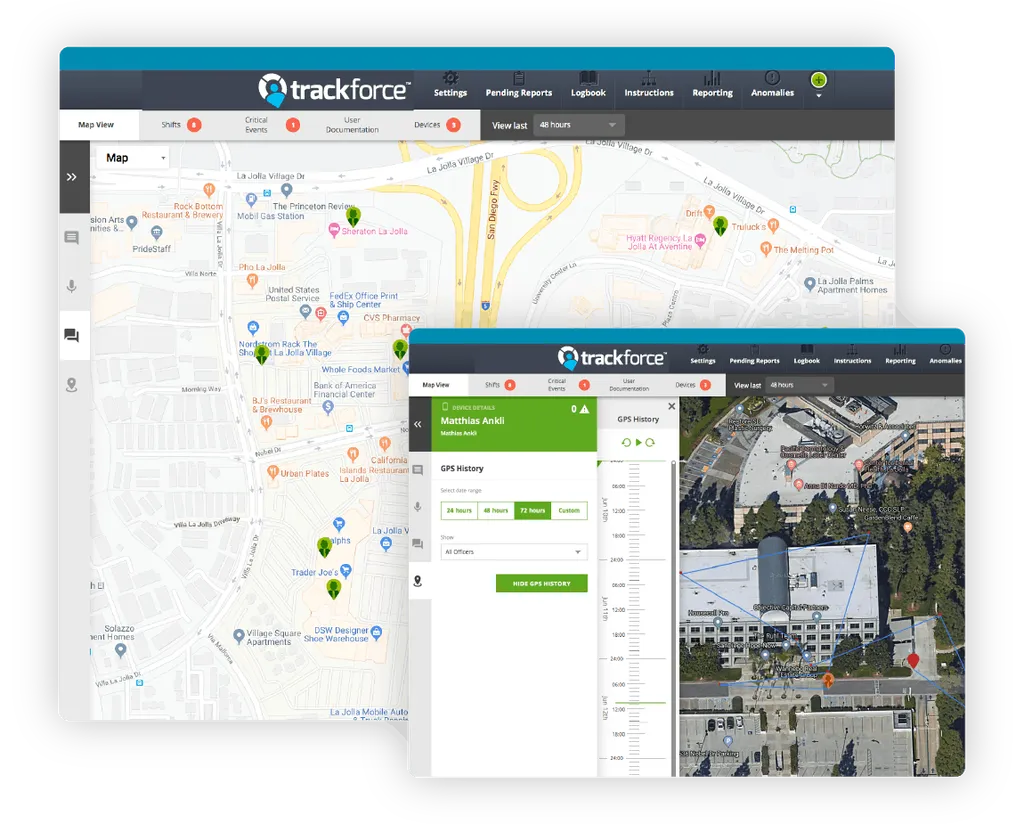
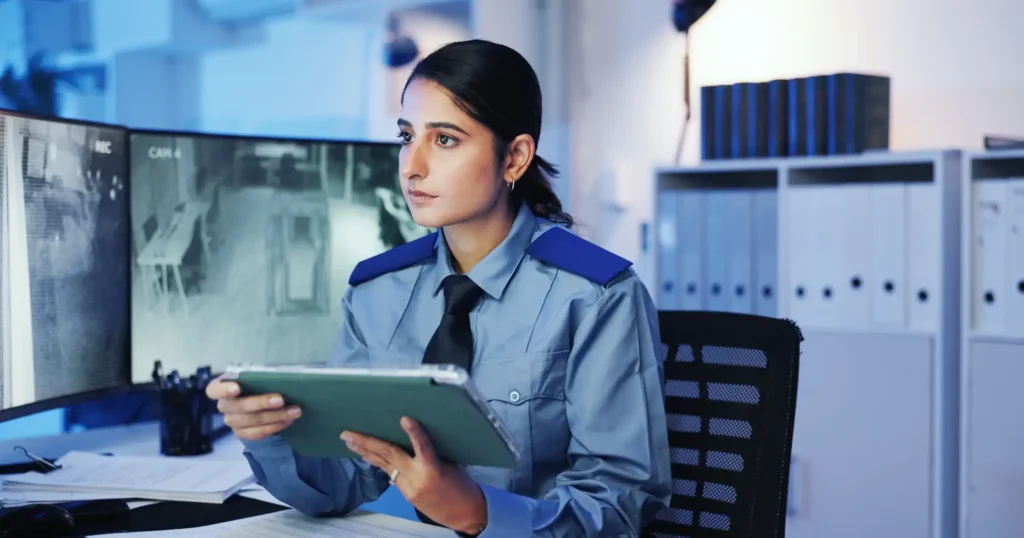
Trackforce’s remote supervision is visualized through the Command Center (GSOC). A Command Center provides supervisors with a complete view of all security operations.
From a guard’s location to shift management and critical events, the Command Center enables remote visibility and site management from one central location be it locally or globally.
Safe and Secure Guarding During Graveyard Shifts
GPS technology provides security supervisors with real-time feedback on where their security team is in proximity to any checkpoints or patrols their guards are conducting.
Using a GPS enabled device helps determine the route of a guard’s tour in proximity to other guards on tour, something especially useful if there is one or more guards on site.
When a guard is working a graveyard shift, extra attention must be given to those working remotely and in isolation. Constant vigilance is possible when a GPS enabled device uses Lone Worker Protection.
Lone Worker Protection, or LWP, is a feature specific to comprehensive security workforce management. LWP uses GPS guard tracking to supervise and communicate with remote lone workers at all times.
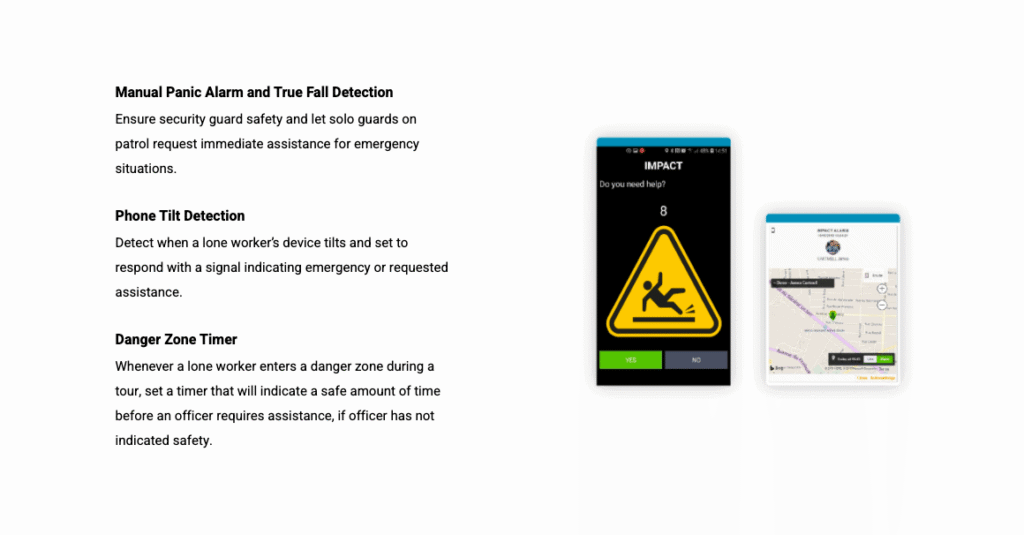
The GPS tracking is visualized on a Command Center map and shows a guard’s exact location in real time. If a lone worker is in need of help, LWP automatically jumps in with tilt detection, manual panic alarm, true fall detection, and a danger zone timer.
This ensures that security directors are always connected to a guard’s safety status.
Tracking a Guard’s Location While Respecting Privacy Concerns
For those managing sites located across the pond, GDPR privacy concerns can be a challenge, especially when using technology like GPS to track guard location.
While onboarding guards may require special attention to privacy concerns and compliance, GPS tracking ensures guard safety and accountability, allowing for security companies to operate more efficiently.
Security companies can also benefit from using GPS tracking as a justification for proving their guards’ location during any given shift, ensuring that a guard’s scheduled work time is properly counted, something especially valuable when supervising remote guards.
We’ve been around for over 40 years, so we know our way in the industry. Trackforce meets the stringent compliance standards set by GDPR and other privacy laws and we are a trusted advisor to our client to meet these regulations in EU and other jurisdictions.
Tracking Teams in Real-Time
When using GPS technology, supervisors gain access to real-time guard activity through the Command Center.
The real-time activity shows where guards are in proximity to the checkpoints on a tour, allowing for supervisors to provide justification on a guard’s route in proximity to other guards’ tour routes, something especially useful if there is one or more guards on site.
This provides further proof that a guard is indeed stationed at their post or is patrolling their scheduled tour.
Creating Boundary Areas With Geofencing
Improving remote security guard management can be as easy as drawing a perimeter on a map with your computer’s mouse. When it comes to proving whether a guard has entered or left their designated post or if a guard is not at their scheduled post, Trackforce’s geofencing can be used to establish boundaries around areas where a guard should be.
The Command Center will set off an alert when a guard is not within the established boundary and will send supervisors a notification.
The Command Center will also show the route of a guard’s tour and will provide documentation on the checkpoints scanned, providing detailed timestamped information for better record keeping and justification.
Ensuring Remote Guard Safety with Lone Worker Protection (LWP)
Lone Worker Protection (LWP) is a solution available with Trackforce’s security workforce management system. LWP uses GPS to track a guard’s exact location with the addition of lone worker safety solutions, like tilt detection, manual panic alarm and true fall detection, and a danger zone timer.
This allows supervisors to track, supervise, and communicate with remote lone workers at all times and always be connected to a guard’s safety status. Lone Worker Protection with tilt detection and a danger zone timer is part of GuardTek in EMEA, and the TrackTik Guard Tour App includes a manual panic alarm and true fall detection for solo officers.
GPS, NFC, QR and Geofencing: What Each One Proves
GPS shows where an officer is, not what they did. That is why most operations combine it with checkpoint scans. For a deeper look at the trade-offs, read the pros and cons of using GPS for security guard tracking.
| Method | What it proves | Best for |
|---|---|---|
| GPS | Where the officer’s device was and the route it took | Mobile patrols, large outdoor sites and live location on the dispatch map |
| NFC tag | The officer was physically at a specific checkpoint | Indoor checkpoints where GPS is less precise, such as stairwells and server rooms |
| QR code or barcode | A checkpoint was scanned at a set time | Low-cost checkpoints and temporary posts |
| Geofence | The officer entered or left a defined zone | Post boundaries, permitted and restricted zones and arrival confirmation |
TrackTik supports all four, so you can match the method to each site rather than forcing one approach everywhere.
Rolling Out GPS Tracking Without Losing Officer Trust
Officers accept location tracking when they understand it protects them as much as it holds them accountable. These steps help a rollout land well.
- Explain what is tracked and why. Safety, proof of service and accurate hours are reasons officers can get behind.
- Put it in writing. Add location tracking to the employee handbook and collect an acknowledgment during onboarding. In GDPR jurisdictions, document the lawful basis and retention period with your privacy advisor.
- Track on shift only. Location data should start and stop with the shift, not follow officers home.
- Lead with safety. Show officers the panic alarm and fall detection before you show supervisors the map.
- Use the data to back officers up. A GPS record settles a client dispute about whether a patrol happened, in the officer’s favor.
- Manage by exception. Set alerts for missed checkpoints and geofence exits so supervisors act on exceptions instead of watching every dot.
How TrackTik Puts GPS to Work Across Your Operation
Trackforce built GPS into every layer of TrackTik, from the officer’s phone to the dispatch map to the client report.
- Verified patrol routes. TrackTik Mobile Patrol confirms checkpoints with GPS and NFC as officers move through the route, and it works offline, so a coverage gap does not become a gap in the record.
- Live map and geofencing. Security guard dispatch keeps a live map of on-duty personnel, and geofencing covers permitted and restricted zones with automated alerts for missed checkpoints.
- The closest officer, every time. The Command Center evaluates GPS location, clock-in status, zone proximity and certifications before it dispatches.
- Safety for solo officers. The TrackTik Guard Tour App includes a manual panic alarm and true fall detection for officers working alone.
- Proof clients accept. Every scan and GPS position is time-stamped and tied to its site, and patterns roll up into business intelligence dashboards.
The results show up at scale. Armour Security grew from 3 guards to 1,250 across six provinces on TrackTik, using GPS-verified checkpoints, patrol dispatch and client reporting.
Where Can I Get More Information?
Trackforce’s experts are readily available to answer any questions you may have. Feel free to request a demo to discover how our solutions can help you.
Frequently Asked Questions
Latest Articles
Featured Resources





See Trackforce in action
Book a walkthrough with our team and see how it fits your operation.